
Try an isolated native browser demonstration
See how a supplied organization identity is bound to ordinary TLS before choosing a production integration. The demo uses synthetic credentials, Pebble ACME and a fresh disposable browser profile. It makes no legal qualification claim. It does not change your normal browser profile, system trust or hosts file.
Prepare your machine
Section titled “Prepare your machine”The bundled setup supports macOS on Apple Silicon. You need authorized repository access, git, curl, tar, shasum, make and network access to Go download and module servers. Bootstrap downloads checksum-verified Go, xcaddy and Pebble; no preinstalled Go, Docker or administrative privileges are required.
Install stock Chrome or Firefox and use the tested browser versions.
Chrome needs its genuine PKIMetadata directory, containing manifest.json and
crs.pb. Check the installed component under:
ls "$HOME/Library/Application Support/Google/Chrome/PKIMetadata"If missing, open chrome://components in your normal Chrome installation and
allow its normal PKI Metadata update. The demo reads and patches only a copy.
For Firefox, install NSS certutil (Homebrew nss) and geckodriver 0.37.1.
Run one demo at a time. Loopback TCP ports 8443, 5002, 14000, 15000, 2019 and
UDP 8053 must be free. Stop only services you own before reclaiming those ports.
Start the Chrome demo
Section titled “Start the Chrome demo”From an authenticated clone:
git clone https://github.com/cztamas/qwacamole.gitcd qwacamolegit checkout mainmake browser-demo DEMO_ARGS='-organization "Example Synthetic Owner TEST" -country HU -locality Budapest -registration NTRHU-TEST-0001'Wait for issuance and the visible browser window. The terminal prints an absolute
.local/browser-demo-*/ state path and local URL. Keep it running. Each launch
uses fresh state and trust; changing owner fields changes the signed certificate.
If detection fails, provide both paths:
make browser-demo BROWSER_ARGS='-browser "/Applications/Google Chrome.app/Contents/MacOS/Google Chrome" -metadata "/absolute/path/to/PKIMetadata/version"'Use Chrome’s site controls → Connection is secure → EU Qualified Status. The displayed organization and country should match your inputs. The qualified row opens the QWAC certificate; Certificate details opens ordinary TLS.
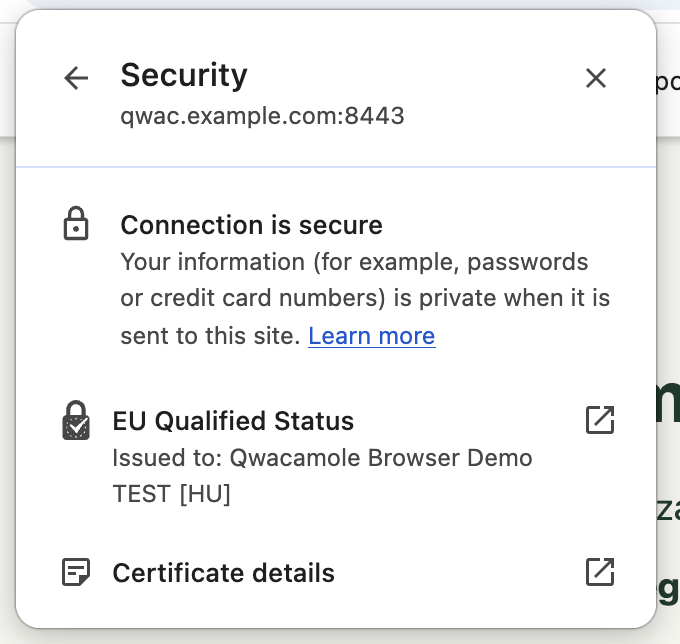
The web page shows server state. Its text is not proof that the browser verified
the binding. The native indicator is a test of the browser with synthetic trust,
not a real EU-qualified identity. Chrome’s test profile uses an explicit CT
exception for private test TLS, while keeping chain, hostname and expiry checks;
never carry those test settings into production. The tested Chrome verifier
ignores binding exp; see browser limitations.
Try Firefox instead
Section titled “Try Firefox instead”Stop Chrome’s demo first, then:
make firefox-demo DEMO_ARGS='-organization "Example Synthetic Owner TEST" -country HU -locality Budapest -registration NTRHU-TEST-0001'Firefox opens an isolated profile and native identity panel. If needed, use the padlock → Connection secure; compare the organization, country and qualified identity text with your inputs. A custom ordinary TLS issuer warning is expected because this profile trusts the local Pebble root.
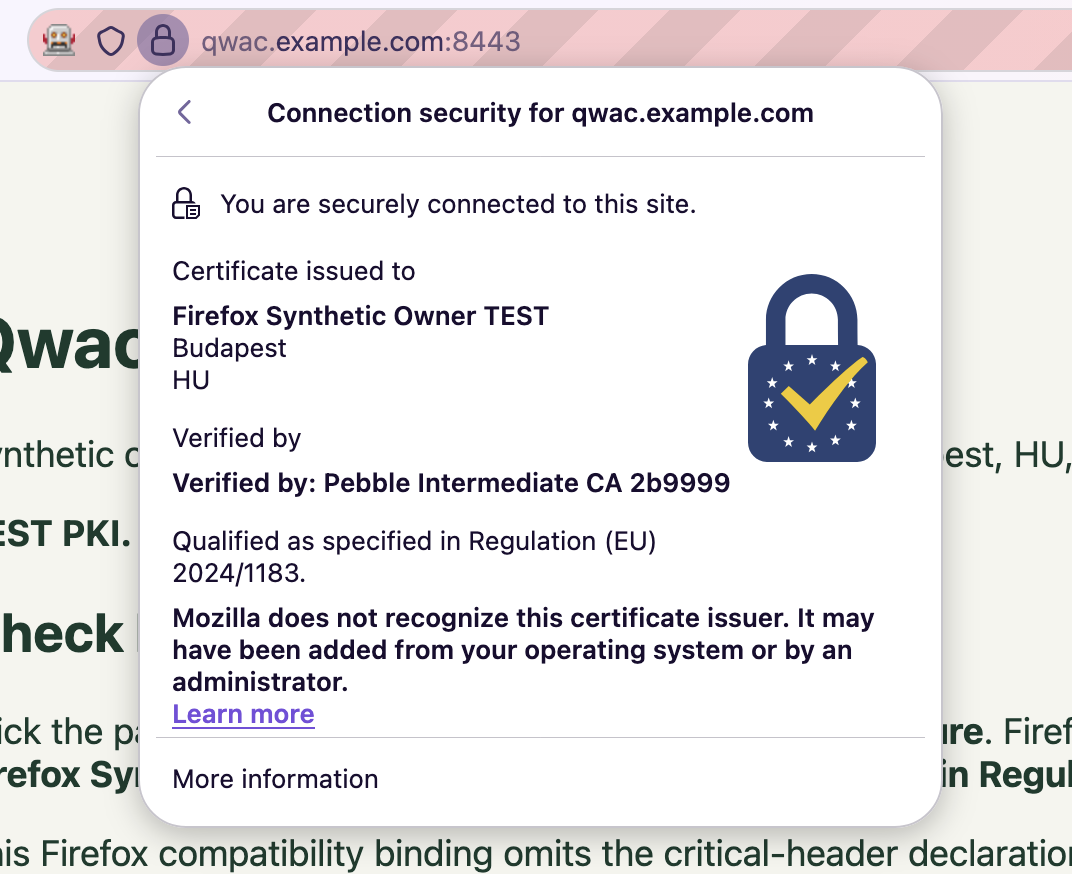
Firefox uses its built-in test-authority list and Mozilla’s public test CA/key,
which are publicly forgeable. That root expires 5 February 2027. Ordinary TLS
trust is imported only into the disposable NSS profile; acceptInsecureCerts
is false. The demo explicitly selects the Firefox compatibility binding profile
and its working legacy identity panel. Neither is a strict JAdES conformance
claim. Normal browser and system trust remain unchanged.
For custom paths:
make firefox-demo BROWSER_ARGS='-browser /absolute/path/to/firefox -certutil /absolute/path/to/certutil -geckodriver /absolute/path/to/geckodriver'Observe a binding and renewal
Section titled “Observe a binding and renewal”While the demo runs, set STATE to its printed absolute path in another terminal:
STATE=/absolute/path/to/.local/browser-demo-123456curl --fail --show-error --cacert "$STATE/pki/pebble-root.pem" \ --resolve qwac.example.com:8443:127.0.0.1 --include https://qwac.example.com:8443/statebin/qwacamole lifecycle -state "$STATE"cat "$STATE/evidence/rotation.json"Curl validates ordinary TLS without -k. A protected response advertises
/bindings/current.jose in its Link header. Renewal can take several minutes:
old_tls_id and new_tls_id should differ, while old_and_new_bound is true.
The held connection stays on the old TLS leaf while the binding covers both.
Reload and reopen the native browser panel to see identity retained after renewal.
To inspect independent refresh:
bin/qwacamole refresh-test -state "$STATE"cat "$STATE/evidence/refresh-test.json"The signed document’s times change while its TLS identifier set stays unchanged. Do not manually generate a binding or restart services to simulate renewal.
Stop and clean up
Section titled “Stop and clean up”Close the demo window or press Ctrl+C in its terminal. It stops its owned browser and local services while preserving the printed state. After stopping, remove only that state if you no longer need it:
make clean STATE=/absolute/path/to/.local/browser-demo-123456Cleanup requires the project state marker and refuses repository/filesystem roots. Do not clean another running demo or delete a conflicting process’s files. Generated private keys, profiles and raw browser logs must remain local.
If the positive identity is absent, check the selected browser/component pair, TLS root, QWAC trust and binding profile separately. A positive trust error or timeout is a failure; do not add broad certificate-error bypasses. For production, continue with the Caddy or Certbot/Nginx quickstart using an issuer-supplied credential and independently selected trust.